> ## Documentation Index
> Fetch the complete documentation index at: https://companyname-a7d5b98e-add-how-to-burning.mintlify.site/llms.txt
> Use this file to discover all available pages before exploring further.
# How to burn
export const Image = ({src, darkSrc, alt = "", darkAlt, href, target, height = 342, width = 608}) => {
const isSVG = src.match(/\.svg(?:[#?].*?)?$/i) !== null;
const shouldInvert = isSVG && !darkSrc;
const shouldCreateLink = href !== undefined;
const minPx = 9;
const maxPx = 608;
const expectedPx = `a number or a string with a number that is greater than ${minPx - 1} and less than or equal to ${maxPx}`;
const createInvalidPropCallout = (title, received, expected) => {
return
Invalid {title.toString()} passed!
Received:
{received.toString()}
Expected:
{expected.toString()}
{}
;
};
const checkValidDimensionValue = value => {
switch (typeof value) {
case "string":
case "number":
const num = Number(value);
return Number.isSafeInteger(num) && num >= minPx && num <= maxPx;
default:
return false;
}
};
let callouts = [];
if (height && !checkValidDimensionValue(height)) {
callouts.push(createInvalidPropCallout("height", height, expectedPx));
}
if (width && !checkValidDimensionValue(width)) {
callouts.push(createInvalidPropCallout("width", width, expectedPx));
}
if (callouts.length !== 0) {
return callouts;
}
const heightPx = Number(height);
const widthPx = Number(width);
const images = <>

 ;
if (shouldCreateLink) {
return
{images}
;
}
return images;
};
Jettons burning is primarily intended to get rid of unnecessary jettons (those with low liquidity or a zero price) and
to influence the market (burning a large number of jettons could increase its liquidity).
Here is the code for that:
```typescript theme={null}
import { Address, toNano, WalletContractV5R1, TonClient } from "@ton/ton";
import { mnemonicToPrivateKey } from "@ton/crypto";
import {
AssetsSDK,
createApi,
} from "@ton-community/assets-sdk";
async function main() {
const client = new TonClient({
endpoint: "https://toncenter.com/api/v2/jsonRPC",
});
const MNEMONIC = process.env.MNEMONIC;
if (!MNEMONIC) throw new Error("Set MNEMONIC (space-separated words)");
const keyPair = await mnemonicToPrivateKey(MNEMONIC.split(" "));
const wallet = WalletContractV5R1.create({
workchain: 0,
publicKey: keyPair.publicKey,
});
const provider = client.provider(wallet.address);
const sender = wallet.sender(provider, keyPair.secretKey);
const NETWORK = "testnet";
const api = await createApi(NETWORK);
const sdk = AssetsSDK.create({
api,
sender,
});
const JETTON_WALLET_ADDR = Address.parse("JETTON_WALLET_ADDR"); // placeholder
const jetton = sdk.openJettonWallet(JETTON_WALLET_ADDR);
const RECEIVER_ADDRESS = Address.parse("RECEIVER_ADDRESS"); // placeholder
await jetton.sendBurn(sender, 1200000n);
}
void main();
```
An alternative way to burn tokens is to send them to a ["zero" account](https://tonviewer.com/UQAAAAAAAAAAAAAAAAAAAAAAAAAAAAAAAAAAAAAAAAAAAJKZ), see [How to transfer](/standard/tokens/jettons/how-to-transfer) page.
## Web services
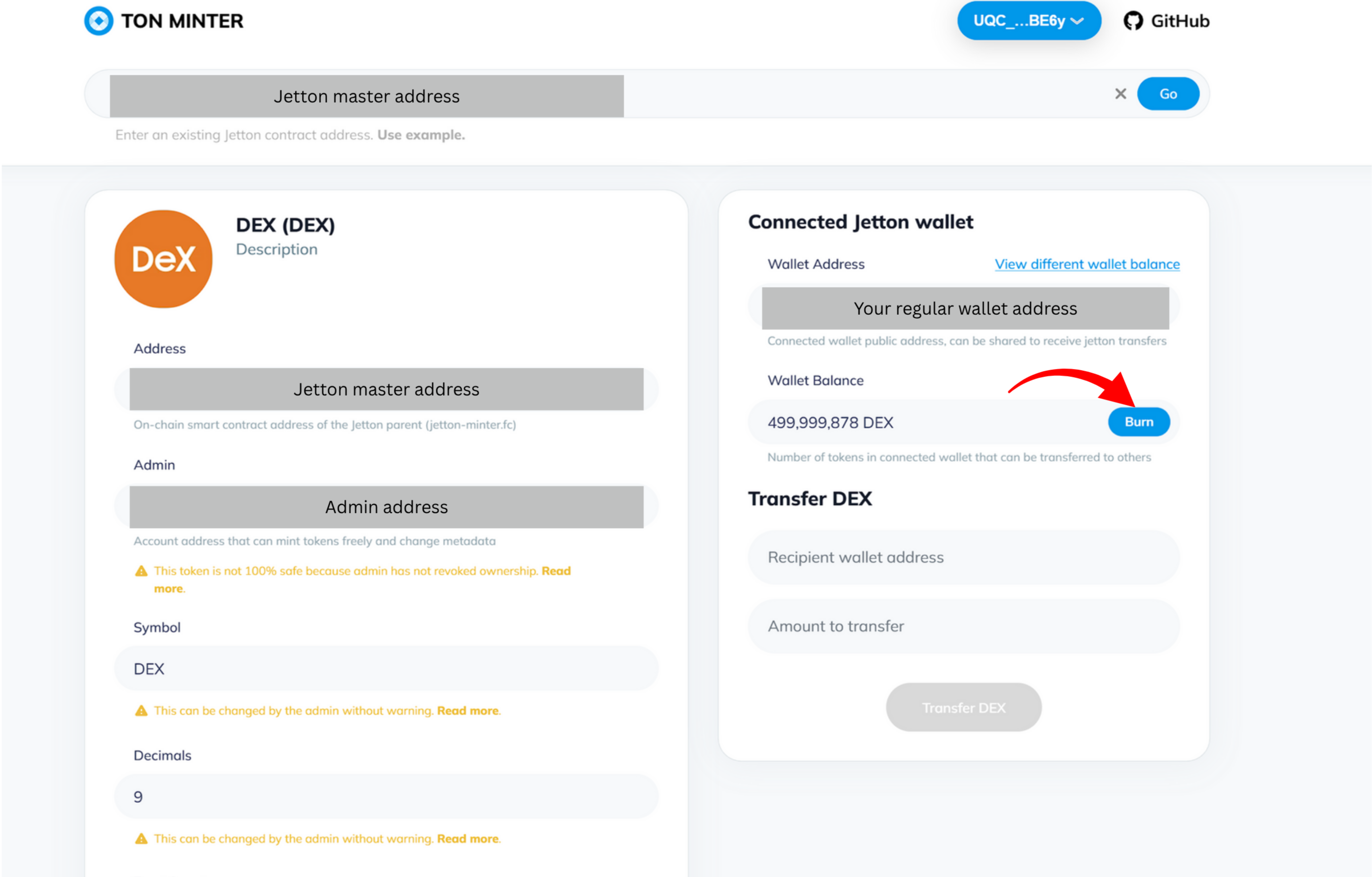
You can also burn tokens without having to write code. Let's consider [TON MINTER](https://minter.ton.org/) as an example.
* Connect your wallet using TON Connect.
* Enter the Jetton master contract address into the "Jetton address" field.
* Click the "Burn" button in your wallet's balance field and enter the amount you want to burn.
* Confirm burning in your wallet application.
;
if (shouldCreateLink) {
return
{images}
;
}
return images;
};
Jettons burning is primarily intended to get rid of unnecessary jettons (those with low liquidity or a zero price) and
to influence the market (burning a large number of jettons could increase its liquidity).
Here is the code for that:
```typescript theme={null}
import { Address, toNano, WalletContractV5R1, TonClient } from "@ton/ton";
import { mnemonicToPrivateKey } from "@ton/crypto";
import {
AssetsSDK,
createApi,
} from "@ton-community/assets-sdk";
async function main() {
const client = new TonClient({
endpoint: "https://toncenter.com/api/v2/jsonRPC",
});
const MNEMONIC = process.env.MNEMONIC;
if (!MNEMONIC) throw new Error("Set MNEMONIC (space-separated words)");
const keyPair = await mnemonicToPrivateKey(MNEMONIC.split(" "));
const wallet = WalletContractV5R1.create({
workchain: 0,
publicKey: keyPair.publicKey,
});
const provider = client.provider(wallet.address);
const sender = wallet.sender(provider, keyPair.secretKey);
const NETWORK = "testnet";
const api = await createApi(NETWORK);
const sdk = AssetsSDK.create({
api,
sender,
});
const JETTON_WALLET_ADDR = Address.parse("JETTON_WALLET_ADDR"); // placeholder
const jetton = sdk.openJettonWallet(JETTON_WALLET_ADDR);
const RECEIVER_ADDRESS = Address.parse("RECEIVER_ADDRESS"); // placeholder
await jetton.sendBurn(sender, 1200000n);
}
void main();
```
An alternative way to burn tokens is to send them to a ["zero" account](https://tonviewer.com/UQAAAAAAAAAAAAAAAAAAAAAAAAAAAAAAAAAAAAAAAAAAAJKZ), see [How to transfer](/standard/tokens/jettons/how-to-transfer) page.
## Web services
You can also burn tokens without having to write code. Let's consider [TON MINTER](https://minter.ton.org/) as an example.
* Connect your wallet using TON Connect.
* Enter the Jetton master contract address into the "Jetton address" field.
* Click the "Burn" button in your wallet's balance field and enter the amount you want to burn.
* Confirm burning in your wallet application.